
Imagine a high-growth fintech company still running its core transactions through a server installed in 2012. To the outside world, they look modern. But internally, the engineering team is terrified to touch the code. One small update could crash the entire system because nobody fully understands how the original system was built.
This isn’t just a technical problem. It’s a big business bottleneck. When your legacy systems consume 80% of your IT budget just for maintenance, you aren’t just staying behind; you are actively losing market share to agile competitors.
Application modernization is not about a full replacement that puts your entire operation at risk. It is a strategic evolution. In fact, as per Businesswire, 87% of respondents in a recent survey identified modernizing critical applications as a key driver of success.
This guide breaks down the implementation frameworks, from the 7 R’s of migration to the Strangler Fig pattern, to help you turn technical debt into a competitive advantage.
Key Takeaways
- Enterprise Application Modernization is the process of updating legacy applications to modern frameworks, cloud environments, and architectures to improve business agility.
- Designing systems specifically for the cloud ensures instant scalability and better cost management from day one.
- Using AI to analyze and rewrite old code saves months of manual work and reduces the risk of human error during transitions.
- Prioritizing mobile design meets the needs of a global workforce that increasingly relies on smartphones for daily operations.
- Integrating IoT and big data tools turns your application into a real-time bridge between physical assets and digital insights.
What is Enterprise Application Modernization?
Enterprise application modernization is the process of upgrading legacy systems to align with current business needs and modern tech standards, transforming hard-to-maintain applications into flexible, efficient, scalable solutions.
In today’s digital landscape, enterprise application modernization frequently involves leveraging a microservices architecture and transitioning a legacy system to a cloud-first model. This process, often referred to as legacy system modernization, enables organizations to enhance agility, scalability, and performance.
For instance, imagine an online store using an old, all-in-one system. During a big sale, the entire site crashes because it can’t handle the traffic. By modernizing to microservices, the store can scale just the checkout part during busy times. This keeps the site running smoothly and saves money, as they only pay for the extra power when they actually need it.
Unlike routine updates that offer small fixes, modernizing your application involves making major changes to its core infrastructure. This end-to-end transformation goes beyond simple patches to create a more agile, scalable, and future-ready system that can support modern demands like AI and real-time data.
What are the 7 R’s of Enterprise Application Modernization
The 7 R’s is a strategic framework used to determine the best path for modernizing your application. It helps you audit your software portfolio to decide which systems should be kept, moved, or rebuilt.
You do not always need to start from scratch; some apps just need a new home in the cloud, while others are better off retired to save costs.
Understanding the 7 R’s of App Modernization Strategy
Before diving into the technical details, here is a simple breakdown of the seven paths you can take:
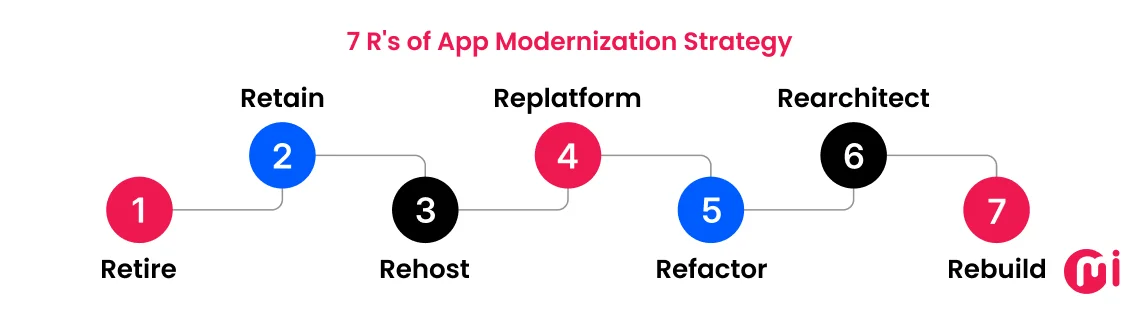
1. Retire
You should turn off applications that are no longer used or fail to provide measurable value to the business.
2. Retain
This involves keeping the application exactly as it is for now, usually because it remains functional or is currently too risky to change.
3. Rehost
You move your application to the cloud without changing any of the underlying code to achieve the fastest possible migration.
4. Replatform
This strategy moves the app to the cloud while making minor tweaks to improve performance without requiring a full overhaul.
5. Refactor
Developers change and optimize specific parts of the code so the application can better handle modern traffic and new features.
6. Rearchitect
You completely change the structure of the application, such as breaking a monolith into microservices, to make it highly scalable.
7. Rebuild
This requires you to start from scratch by discarding the old code and writing a new version using modern programming languages and architectures.
To get the highest ROI, you must align your technical strategy with your specific business objectives. Using the wrong “R” can lead to wasted budget or unnecessary downtime.
Here is how to match the 7 R’s to some of your primary business goals:
1. Goal: Immediate Cost Reduction
Best Strategy: Retire or Rehost
Why: If an application is redundant, retiring it eliminates maintenance costs instantly. If you need to shut down an expensive on-premise data center quickly, Rehosting (Lift and Shift) moves your apps to the cloud with minimal labor costs.
2. Goal: Speed to Market and Agility
Best Strategy: Re-architect or Refactor
Why: If your developers are struggling to push updates because the code is too tangled, you need to rearchitect. By breaking the app into microservices, teams can update the payment module without touching the inventory module, allowing for weekly instead of quarterly updates.
3. Goal: Scalability and Performance
Best Strategy: Replatform or Refactor
Why: If your site crashes during high-traffic events, replatforming allows you to swap a slow legacy database for a high-performance cloud database. Refactoring goes deeper, optimizing code so it uses fewer resources and scales automatically.
4. Goal: Eliminating Technical Debt
Best Strategy: Rebuild
Why: Sometimes, legacy code is so old that nobody knows how it works, and finding developers who speak that language is impossible. Rebuilding allows you to start fresh with modern languages such as Node.js or Python that are easier to maintain and recruit for.
5. Goal: Risk Mitigation (Stability)
Best Strategy: Retain
Why: For some highly sensitive industries, a legacy system might be ugly but 100% stable and compliant. If there is no clear business reason to move it, retaining it avoids the risk of a botched migration.
To help you decide which “R” is right for your project, use this comparison of impact, value, and risk level.
| Strategy | Technical Impact | Business Value | Risk Level | Time-to-Market | Best Use Case |
| Retire | Complete decommissioning. | High cost savings; removes redundant tech. | Low | Immediate | Duplicate apps or tools that no longer serve a business purpose. |
| Retain | Zero change; maintain existing environment. | Low; keeps the status quo without new investment. | Low | N/A | High-security legacy systems that are too costly or risky to move. |
| Rehost | Lift-and-shift to cloud (IaaS) with no code changes. | Moderate; reduces hardware overhead quickly. | Medium | Fast (Weeks) | Large-scale migrations where speed is prioritized over optimization. |
| Replatform | Minor code/config tweaks to use cloud services (PaaS). | High; improves scaling without a full rewrite. | Medium | Moderate (Months) | Apps that need better performance but have a limited budget. |
| Refactor | Significant code optimization for cloud features. | Very High; improves agility and technical debt. | Medium-High | Long (6+ Months) | Core business apps that are stable but difficult to scale or update. |
| Rearchitect | Shift from Monolith to Microservices/Serverless. | Maximum; enables DevOps and total scalability. | High | Very Long (1 Year+) | Strategic, mission-critical apps that need to evolve daily. |
| Rebuild | Total rewrite using modern tech stacks (Go, Node.js). | High; removes 100% of legacy technical debt. | Very High | Very Long (1 Year+) | Apps where the original code is “spaghetti” and unmanageable. |
Key Benefits of Modernizing Legacy Application
Beyond general system improvements, modernizing your application is a strategic move to stay competitive.
In fact, a RedHat survey revealed that 95% of respondents consider app modernization a critical step toward their organization’s success. This transformation offers several high-impact advantages for your business:
1. Reduce Costs
By eliminating high-maintenance expenses associated with legacy systems, enterprise application transformation helps bring down the cost of operations.
Legacy systems require expensive, specialized hardware and niche developers to maintain. Modernization moves you to the cloud, where you only pay for the resources you use and use modern languages that are cheaper to support.
For instance, a company moves its on-premise servers to AWS. Instead of paying for 100% server capacity 24/7, they use auto-scaling to pay for 10% capacity at night, cutting infrastructure costs by 40%.
2. Increased Business Agility
Legacy systems are often tightly coupled, meaning one small change can break the entire application. By adopting a microservice architecture, you break the app into independent parts.
This allows your team to update a single feature, like a login button or a checkout flow, without needing to redeploy the whole system. This streamlined process enables your business to respond faster to market changes and customer needs.
For instance, a retail brand wants to add Apple Pay to its payment page. Because their app uses microservices, they can plug in the new payment block in a few days without affecting the other functions of the system.
On the other hand, their competitors with legacy systems take months because they have to rewrite and test their entire codebase.
3. Enhanced Security and Compliance
Legacy applications usually lacks modern security mechanisms. By modernizing your application, you replace outdated code with the latest encryption and security protocols, making it much harder for cyber threats to breach your system. This also ensures your business stays compliant with current data protection regulations.
Old systems mostly run on end-of-life software that no longer receives security patches. One of the best advantages of integration is that it integrates security directly into the development pipeline (DevSecOps), ensuring every update is automatically scanned for threats.
This also ensures that your application meets the global and local security compliance standards such as HIPAA, PCI DSS, GDPR, SOC 2, and more.
For example, a healthcare provider modernizes its patient portal to include automated encryption and multi-factor authentication (MFA). By doing so, they not only protect patient records from breaches but also pass their annual compliance audit with zero penalties.
4. Improved Scalability and Performance
Legacy systems often crash under pressure. Modernization moves you to a cloud-native setup, allowing your application to scale automatically. When thousands of users visit at once, the system adds more computing power instantly. When traffic drops, it shrinks back down to save you money.
Instead of owning fixed servers that sit idle, you use cloud resources that grow or shrink based on real-time demand. For instance, an insurance company sees a 500% spike in claims after a major storm. Their modernized system scales up to handle the traffic, ensuring the website stays online when customers need it most.
5. Superior User Experience
Legacy applications are often slow, clunky, and difficult to use. Modernization allows you to implement modern frontend frameworks and headless architectures. This ensures your application is fast, responsive, and works perfectly on any screen size.
By separating the backend from the frontend, you can deliver a smooth, app-like experience. This reduces load times and makes navigation intuitive, which keeps users engaged.
For instance, a legacy banking app that used to take 10 seconds to load a balance now refreshes instantly. This leads to higher customer satisfaction, better app store ratings, and fewer support calls from frustrated users.
6. Integration with AI and Emerging Tech
Legacy systems often work in data silos, meaning their information is trapped in old formats that modern tools can’t read.
Modernization breaks these silos by using APIs. This allows your app to connect instantly to powerful technologies like Artificial Intelligence, Machine Learning, and IoT.
APIs act as a bridge, allowing your core system to talk to modern AI services. This turns your static data into actionable insights without needing to build an AI engine from scratch.
For instance, a logistics company modernizes its fleet tracking app. It can now connect to an AI engine that predicts the fastest delivery routes based on real-time traffic and weather. This doesn’t just save thousands in fuel costs; it allows the company to offer a guaranteed delivery window to customers.
7. Increased Revenue and Competitive Advantage
Boost revenue and gain a competitive edge by modernizing operations to introduce new services, streamline processes, and adopt more efficient, innovative ways of working.
Modernization allows you to launch new features and services that were technically impossible on your old system. When you can deliver updates faster and offer a better user experience than your competitors, you naturally increase your market share and open new revenue streams.
For example, a traditional retail chain modernizes its inventory system to sync in real-time with its mobile app. This allows them to launch a “Buy Online, Pick Up In-Store” (BOPIS) service.
While their competitors still struggle with inaccurate stock data, this company gains a massive advantage by offering a convenience that modern shoppers demand, leading to a direct boost in sales.
Common Challenges in Legacy System Migration
Modernizing your application is a high-reward strategy, but the process involves significant technical and operational hurdles. Understanding these challenges early allows you to build a proactive roadmap and avoid the common pitfalls that stall digital transformation.
1. Complex System Dependencies
Legacy applications don’t sit alone. Over many years, they have been connected to dozens of other internal tools, custom work processes, and outside services.
These connections are often messy and poorly documented. If you move or change one part of the system without a plan, it can cause a “domino effect” that breaks other important tools you use every day.
The Solution: Before starting your enterprise modernization, perform a dependency audit to create a clear map of how all your applications connect. By identifying these links early, you can modernize your system in small, safe stages rather than all at once.
This ensures that even as you upgrade your core app, your existing business operations continue to run without interruption.
2. Data Migration and Integrity Risks
Shifting data between systems is more than just copy and paste. Legacy systems often use outdated formats, inconsistent schemas, or broken references that don’t fit modern databases.
This can lead to a bad transfer, which can cause lost customer records, corrupted files, or major compliance headaches. If data is missing or wrong after the move, it can take months of expensive manual work to fix.
The Solution: Use an incremental migration strategy combined with a data validation phase. Instead of moving all your data in one high-risk event, you move it in small, manageable batches.
At each step, automated tools compare the old data to the new to ensure every record is accurate and complete. This clean-as-you-go approach ensures that if an error occurs, it is caught and fixed immediately without affecting your entire database.
3. Cultural Resistance and Mindset Debt
Sometimes the biggest blocker isn’t the code, it’s the people. Teams that have used the same system for 10+ years may fear disruption or the learning curve of new tools. Without buy-in from your staff, even the best technical solution will fail to gain adoption.
The Solution: Implement a structured change management plan that starts long before the code is written. Begin by identifying key employees who are excited about the change to help mentor others.
Provide clear communication on how the new system will solve their specific frustrations, like reducing manual data entry. Finally, offer hands-on training sessions and sandbox environments where employees can practice using the new tools safely before the official launch.
4. Balancing Costs and ROI
Enterprise app modernization is a significant investment. Upfront costs for cloud infrastructure, new software licenses, and specialized talent can be intimidating for stakeholders.
If you cannot prove a clear Return on Investment (ROI), the project risks losing its funding halfway through. Without a defined financial roadmap, modernization becomes a money pit rather than a growth engine.
The Solution: Connect every technical update to a specific business goal using a Phase-Based ROI Model. Instead of asking for the entire budget at once, break the project into small steps that provide Quick Wins.
For example, you could first modernize a single feature that reduces your monthly server bills or helps more customers complete a purchase. By showing the money saved at each step, you prove the project is worth the investment.
This creates a cycle where the success of the first phase helps fund and support the next ones.
5. Talent Scarcity for Legacy Code
As older developers retire, finding experts who understand legacy languages (like COBOL, Delphi, or early Java) is becoming nearly impossible and very expensive.
This increases the risk of being stuck with a black box system. If a critical part of your software breaks, there may be no one available who knows how to fix it. This puts the entire business at the mercy of reducing pool of specialists who charge premium rates.
The Solution: Prioritize modernizing the most fragile parts of your system first. By moving your core functions to popular, modern languages like Node.js, Python, or Go, you open up a massive pool of talented developers. This makes it much easier and more affordable to hire, train, and grow your technical team for the long term.
Enterprise Application Modernization: Step-by-Step Process
Modernizing your application is a strategic process that aligns your technology with your business goals. Rather than a quick fix, it is a continuous lifecycle that ensures your software stays fast, secure, and valuable as your company grows.
It requires careful consideration, from assessing current systems to deploying modernized applications that will help the business grow and adapt to future challenges.
The following five key steps outline the framework for a successful enterprise application modernization journey, ensuring minimal disruption and maximum return on investment (ROI):
Step 1: Application Inventory and Assessment
The app modernization journey begins with assessing the current state of what is working and what is holding you back. It is not possible to build a roadmap until you know exactly where you are starting.
During this phase, you gather key stakeholders, department heads, and daily users to map out every part of your existing architecture.
How to do it:
- Audit Technical Debt: Identify the specific parts of your code that are outdated or increasingly expensive to maintain. By assessing your technical debt, you can pinpoint issues such as an old billing module requiring monthly manual fixes—and prioritize them for modernization.
- Evaluate Pain Points: Talk to employees to see where the system slows them down. A common example is a sales team that cannot access customer data on mobile devices because the system only works on desktops.
- Define Success: Establish clear benchmarks, such as reducing system downtime by 20% or cutting page load times in half.
Step 2: Choosing the Right “R” Strategy
Once you understand your system, you must decide how to transform it. Not every application needs a full rewrite. You should choose a strategy from the 7R’s matrix based on your budget, time, and business goals.
How to do it:
- Retain or Retire: Keep apps that still work well or shut down those that no longer provide value. This saves budget for bigger projects.
- Rehost or Replatform: Move apps to the cloud with little to no code changes. For example, moving a local file server to a cloud-based system to improve access for remote teams.
- Refactor or Rearchitect: Rewrite parts of the code to use modern features. For example, by breaking an app into smaller microservices so you can update the login screen without touching the payment system.
- Replace: Trade your old custom application for a modern third-party product.
Choosing the right mix of these strategies helps you balance fast results with long-term innovation.
Step 3: Defining the Target Architecture
Now you must design the blueprint for your new system. This stage defines how your application will run, store data, and connect with other tools in the future. Instead of just fixing the old code, you are building a modern foundation that can grow with your business.
How to do it:
- Move to Microservices: Break your application into small and independent parts. For example, if your “Payment” service needs an update, your “Product Search” service can stay online without interruption.
- Adopt Cloud Native Tools: Use technologies like containers to ensure your app runs the same way on any server. For example, your app can automatically add more power during a holiday sale to prevent crashing.
- Plan for APIs: Build bridges so your system can easily talk to modern AI tools or third-party services like PayPal or Salesforce.
A solid target architecture ensures your system remains fast, secure, and easy to upgrade as your business grows.
Step 4: Incremental Execution
Gradually progressing in your modernization journey is the best way to move ahead. Going ahead hastily can cause total system failure. Instead, modernize your application in small and manageable stages.
This allows you to launch and test new features one by one while your business continues to run smoothly on the existing system.
How to do it:
- Start Small: Choose one important but simple feature to move first. For example, you might modernize your customer feedback form before touching your payment processing system.
- Run Systems Together: Keep your old and new applications running at the same time. This ensures that if the new version has a bug, your employees can still use the old one to finish their work.
- Test Often: Check each new piece of code as soon as it is built. This helps you find and fix errors before they become expensive problems.
Step 5: Continuous Testing and Optimization
The final stage moves your modernized application from a safe testing area to the live production environment. This phase ensures that your new application is fully operational and actually helps you reach your business goals.
It is not just about the launch day but also about how the system performs over time.
How to do it:
- Run Final Checks: Perform a final test on your live servers to confirm everything works as expected. For example, verify that a customer can complete a checkout without any errors.
- Onboard Your Team: Provide hands-on training and guides so employees feel confident using the new tools.
- Monitor and Improve: Use tracking tools to watch for slow loading times or user errors. If you notice that the “Search” bar is lagging during busy hours, you can optimize it immediately.
This ongoing attention ensures your application stays fast, secure, and valuable to your users.
Future Trends in Enterprise Application Modernization
If you are a business planning for business application modernization, keeping an eye on the emerging future trends is important. Staying ahead of the curve will help you avoid any major overhaul in the near future.
1. Leveraging AI for Application Modernization
By integrating AI directly into your app, you can automate complex tasks and make smarter decisions based on real-time data. This power helps businesses stay ahead of the competition by predicting needs rather than just reacting to them.
AI turns your application from a basic tool into a smart partner capable of advanced analytics and personalized user experiences. For instance, a logistics company can use AI to automatically predict the best shipping routes based on weather and traffic, saving thousands in fuel costs every day.
While the potential of AI is huge, setting it up can be complex. To ensure a smooth transition, many enterprises partner with experts in AI integration services to build custom machine learning models that plug directly into their newly modernized architecture.
2. Integrating Big Data Analytics
Modern applications turn data into a competitive advantage. By integrating big data tools, your application can process and analyze massive amounts of information in real time.
Big data services can help you develop applications that uncover hidden patterns and growth opportunities that are impossible to see in old, siloed systems. This allows leaders to stop guessing and start making decisions based on actual user behavior and market trends.
For instance, a global bank can analyze millions of transactions per second to detect fraud instantly. Instead of reviewing a suspicious purchase days later, the system can block a fraudulent card the moment the transaction is attempted, saving millions in potential losses.
3. Convergence of IoT
Application modernization allows your app to step out of the office and connect with the physical world through the Internet of Things (IoT). By linking sensors and smart devices directly to your applications, you gain a real-time view of your entire operation.
A modernized cloud setup simplifies the complexity of managing thousands of data streams by creating a live bridge between your physical assets and digital tools. This connection provides a secure way to track operations in real time and enables instant updates with automated responses.
For example, smart warehouses use IoT sensors on shelves to track inventory. The moment a product is picked, the modernized app automatically updates the stock count and orders more from the supplier if the supply is low. This removes the need for manual stock checks and prevents human error.
4. Cloud First Approach
A cloud-first approach means building your application to live in the cloud from the very start instead of forcing old programs to work on modern systems later. This strategy allows you to grow your digital footprint instantly and scale your business quickly.
Cloud migration provides a massive advantage over traditional systems that require manual hardware updates. For instance, a streaming service can handle millions of viewers during a live event because its cloud-first design automatically adds more server power as people tune in. When the event ends, the system shrinks back down to save on costs.
5. Mobile First Design
A mobile-first approach means designing your application for smartphones and tablets before adapting it for desktops. Since mobile phones now account for nearly 60% of global web traffic and 96% of users go online via mobile, your application must prioritize the small screen to stay relevant.
It helps to provide a smooth and fast experience for people on the move. By focusing on the mobile screen first, you force the design to be simple, clean, and free of unnecessary clutter.
Take, for instance, a construction management firm can use a mobile-first app to let site managers upload photos and sign off on safety reports directly from their phones. They no longer have to wait until they are back at a desk, which keeps projects moving faster.
Role of AI in Application Modernization
AI tools can scan millions of lines of messy legacy code in seconds. This saves developers from months of manual work by instantly identifying bugs and suggesting modern improvements.
Because of this speed and accuracy, 53% of companies now use AI to power their application modernization projects.
This reduces the risk of human error and cuts down the time needed to move to the cloud.
How it helps:
- Code Conversion: It understands the logic behind old languages like COBOL or Delphi and rewrites them into modern languages like Java. This preserves your original business rules while making the application compatible with today’s cloud environments.
- Smart Testing: Traditional testing is slow and often misses edge cases. AI generates millions of unique test scenarios instantly. It compares the output of the old system with the new one to ensure every calculation and data point remains perfectly accurate during the move.
- Auto Updates: Once your new application is live, AI acts as a 24/7 monitor. It learns what normal performance looks like and identifies small irregularities. If a server starts to slow down or a security pattern looks suspicious, the AI can trigger an automatic fix or alert your team before users ever notice a problem.
Using these tools ensures your modernization project stays on schedule and delivers a smarter, faster application.
How MindInventory Stands Out as an Application Modernization Partner
Whether it’s rearchitecting an enterprise application or migrating legacy on-premise systems to the cloud, MindInventory has earned a reputation as a strategic technology partner, delivering cutting-edge application modernization services to businesses worldwide.
From revamping an inventory management system and centralizing the fitness e-commerce store for Nutristar, to transforming PangeaPod’s hotel management from a traditional reception desk setup to an advanced, multi-device IoT-enabled solution, we’ve been consistently delivering exceptional results.
Our customers choose MindInventory for reasons that go beyond our technical expertise:
- Instead of trying to sell your services, the MindInventory team chose to listen to me,” says Erika Migliaccio from Wellness Industry.
- They understood the vision and added ideas to the concept, which felt like a synergy,” says Elan BenAmi (our client since 2011) from Wellness Industry.
- Their deep understanding of my project and exceptional communication skills impressed me a lot,” notes Rod Ferris from the Hospitality Industry.
- MindInventory helped me rewrite an iOS app, develop a new Android app, and create a reporting agency panel and backend in a very short amount of time with robust quality,” shares Tim Oppenheim (celebrating seven years of collaboration) from the Software and Utility Industry.
These are just a few examples of the trust we’ve earned. You’ll find many more client testimonials that can help you make an informed decision when choosing your enterprise app development company.
From strategic consultation and technical assessments to application modernization strategy and execution, the MindInventory team follows industry-standard processes to ensure your enterprise’s legacy system modernization is seamless and successful.
FAQs About Enterprise App Modernization
Application modernization is the process of upgrading legacy applications to align with current tech standards and business needs. By moving away from outdated code, you transform rigid systems into flexible, cloud-ready solutions that are more secure, easier to scale, and faster to develop.
Application modernization services provide the expertise and tools needed to transform outdated legacy systems into high-performance digital assets. These services typically involve migrating applications to the cloud, breaking down monolithic code into agile microservices, and implementing modern practices like containerization and CI/CD automation. By leveraging these services, businesses can transition to a more efficient infrastructure that supports rapid scaling and continuous innovation.
Modernization preserves your unique business logic and custom data while upgrading the foundation. It is often more cost-effective and less disruptive than starting from scratch with a generic platform that might not fit your specific operational needs.